Introduction
Cities are vital to your civilization’s success. They allow you to build units, buildings, and wonders. They allow you to research new technologies and gather wealth. You cannot win without powerful, well-situated cities.
How to build cities
Cities are constructed by Settler units. If the Settler is in a location where a city can be constructed, the “Found City” action button will appear. Select the button and the Settler will disappear, to be replaced by the new city.
Where to construct cities
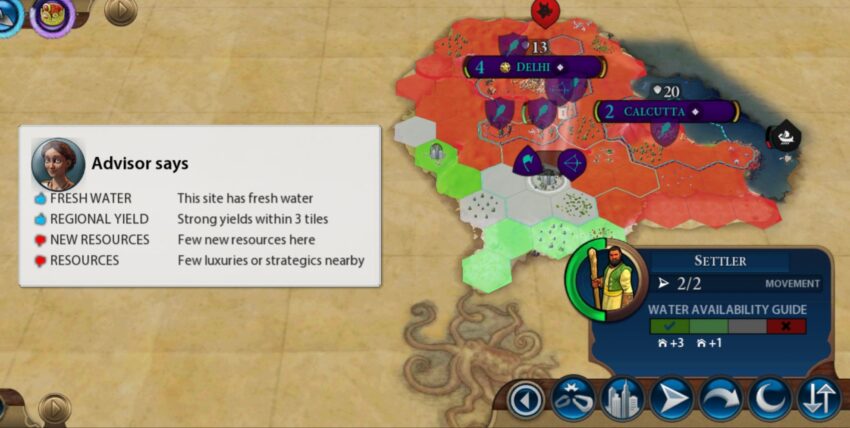
Cities should be constructed in locations with plenty of Food and Production and with access to Strategic, Luxury, and Bonus resources. It is often a good idea to build a city on a River or coastal hex, as sources of water are very important to a growing Population. Cities constructed on Hills gain a defensive bonus, making it harder for enemies to capture them.
With a Settler selected, ideal city locations will be shown on the map with an icon. Additionally, every Settler after your first will show the Settler Lens, giving you an idea of where on the map will provide the best source of water for your city, and indicating unavailable tiles.
Growth
Your city will grow, or add more Citizens, with surplus & Food. Any amount of Food over the total consumption of a city’s Citizens, 2 per, is considered surplus, and is added as progress towards a new Citizen.
A city will add all surplus Food towards growth if its current Population is 2 or more below the city’s Housing limit. If the city is 1 Population below its Housing limit, its growth will slow to 50%. When the Population is at the Housing limit, it will grow only at 25% the normal rate. A city can grow to 5 Citizens over its Housing limit at this rate, and then it will stop growing entirely.
A city will stagnate and not grow if it does not have surplus Food. If it makes less & Food than its Citizens consume, the city will starve and slowly lose Population until it is able to support itself again.
Food
A city requires 2 Food per Citizen (another term for ” Population”) per turn to avoid starvation. A city acquires & Food (as well as other yields) by assigning its Citizens to “work” the land around the city.
The city can work any tile within 3 spaces of the city that is also within the civilization’s borders, provided as well that it is not being worked by another city. Cities cannot work tiles occupied by wonders.
Left to its own devices, the city will assign as many Citizens as needed to acquire its Food.
Housing
Housing is a representation of the maximum amount of Citizens or Population you can have in each city. The base source of Housing is a water source.
Many buildings grant Housing. After researching Pottery, every city is able to build a Granary, which adds 2 Housing, and later they can build Sewers, which also adds 2 Housing.
Buildings in other districts sometimes add Housing, such as the Barracks in the Encampment district, the University in the Campus, and the Lighthouse in the Harbor. The Palace building in your capital city also adds 1 Housing.
Population-1 Housing for every 2 such improvements. Populations prior to the Industrial Era, when the Each Farm, Pasture, Plantation, or Camp supports a small amount of Supporting rural Population in this fashion will allow for slightly larger Neighborhood district becomes available.
Water
Placing your city near a water source should be one of your first decisions in any game. The presence of a good water source will immediately set the initial Housing level of a city. A city not adjacent to any water will have a max Population of 2 at the start. A city on the coast will have a max Population of 3. And a city adjacent to a River, Lake, or Oasis will have a max Population of 5.
The fresh water status of a city may be upgraded by adding an Aqueduct tile next to the City Center. Aqueducts may only be placed in tiles that are adjacent to a River, Lake, or Mountain that is also adjacent to the City Center. Completion of the Aqueduct district raises the city’s Housing from water by 2 or up to 6, whichever is larger-so 7 if adjacent to River, Lake or Oasis, or 6 otherwise.
Districts
In Civilization VI, buildings are no longer trapped in your City Center, but may sprawl across your territory as part of districts. The map is more important than ever as you are faced with important strategic placement decisions. The Campus and Holy Site each receive special boosts from placement near Mountain tiles, but the Campus also benefits from a nearby Rainforest tile.
A city must expand its Population before it can construct multiple districts:
- 1 Population for 1 District
- 4 Population for 2 Districts
- 7 Population for 3 Districts
Each additional District requires +3 Population
The Aqueduct, Neighborhoods, and Spaceports ignore this Population requirement. Districts which require a certain number of Population are specialty districts.
When a city is ready to construct something, the Choose Production button will appear. If a district can be constructed, it will appear on this menu. Select the district to order the city to begin construction, opening the district placement lens.
Here, you will be given an overview of the different yield outcomes available on the tiles surrounding your City Center, and you can better make a decision about where to place your district.
This lens will also show you which tiles are unavailable, as some districts have very specific placement requirements (for example, the Encampment cannot be built adjacent to a City Center). Furthermore, all districts must be built within 3 tiles of a City Center.
Districts may be placed on top of features such as Woods or Rainforest if you have the technology to remove those features, but for a longer construction time. No District can be built on a floodplain.
Neighborhoods and Appeal
Neighborhoods are a special district that allows a city to house more Population and is affected by Appeal. The term “Appeal” is used to describe a special form of adjacency bonus that just applies to Neighborhoods, and also will affect the Culture Victory’s Tourism system through National Parks and Seaside Resorts.
- Breathtaking Neighborhoods provide 6 Housing.
- Charming Neighborhoods provide 5 Housing.
- Average Neighborhoods provide 4 Housing.
- Uninviting Neighborhoods provide 3 Housing.
- Disgusting Neighborhoods provide 2 Housing.
Finally, Appeal also affects the ability to place National Parks and Seaside Resorts. A tile’s Appeal can be viewed in its tooltip and is affected by the following:
- +4: if the tile is on a Mountain.
- +2: Each adjacent Natural Wonder
- +1: Each adjacent Holy Site, Theater Square, Entertainment Complex, or wonder
- +1: Each adjacent Mountain, Coast, Woods or Oasis
- +1: If the tile is on a River or Lake
- +1: Each Château and Sphinx.
- -1: Each adjacent Industrial Zone, Encampment, Airport or Spaceport
- -1: Each adjacent Rainforest, Marsh or Floodplain
- -1: Each adjacent pillaged tile
- -1: Each adjacent Mine, Quarry, Oil Well, Offshore Oil Rig, and Airstrip
Buildings
After your district has been built, you may now begin populating it with buildings. Buildings can be built through the Production Menu similarly to how you build your district. Some buildings have prerequisites, such as other buildings or technology requirements; these buildings will not be visible in your Production Menu.
You may notice that you have some buildings available to build before you place any districts, such as the Monument. These buildings reside in the City Center.
Wonders
Wonders are a special type of building that fills an entire hex and has a significant impact on gameplay. When you select one to build from the Production Menu, you will enter the placement lens, just like you would for building a district.
Most wonders have specific placement requirements, and the lens will highlight which tiles are available. All wonders must be built within 3 tiles of a City Center. If you complete a wonder in a city, that city will immediately expand its borders by two tiles.
Each wonder is unique. Though multiple civilizations may attempt to build the same wonder, only the civilization that first completes the wonder can reap its benefits. Civilizations failing to complete a wonder in time are refunded a portion of Production and some Gold.
For more information on each wonder, see the Wonders and Projects section of the Civilopedia.
The Palace
The Palace is a special building. Part building, part wonder, the Palace automatically appears in the first city you build, which makes that city the Capital of your empire.
The Palace provides a small amount of Production, Science, Gold, and Culture to your civilization. If your Capital is captured by another civilization and you still have other cities under your control, the Palace will automatically transfer to another city, which will become your new Capital.
Citizens
Cities thrive based upon the land around them. Their Citizens “work” the land, harvesting & Food, Gold, Production, O Science, and many other yields from the tiles. Citizens can work tiles that are within three tiles’ distance from the city and that are within your civilization’s borders.
As your city grows, it automatically assigns its Citizens to work the lands around it. It seeks to provide a balanced amount of Food, Production, and Gold. You may order a city’s Citizens to work other tiles – for example, if you want a certain city to concentrate on generating Gold, or Production, select the Manage Citizens icon in the City Selection Panel to choose specific tiles for your Citizens to work.
Happiness
Happiness measures the contentment of your people in a single city, and is measured by seeing if the Population of that city has as many Amenities as expected. 1 Amenity is required for each 2 Population, starting at a Population of 3.
A Content city will not have any modifier applied to it, but a Happy city will have a 10% growth increase and a 5% yield increase. Furthermore, an Ecstatic city will have a 20% growth increase and 10% yield increase. Likewise, having too few Amenities will create displeasure among your Citizens, and the growth and yields will receive negative modifiers. At the level of Unrest, your growth will stop and you may find rebel partisans in your city.
Amenity Sources
Amenities can come from a wide variety of sources. Each type of Luxury resource can contribute up to 4 Amenities to your empire (1 per city) to the 4 cities that need them most. Distribution happens automatically, as long as the Luxury resource is improved (a Plantation improvement built on Spices, for example).
The Arena, built in the Entertainment Complex, provides Amenities to its local city. The Zoo and Stadium also provide Amenities, but regionally. Some wonders also provide Amenities. Furthermore, there are a few Religious Beliefs and policies that provide Amenities. Some Great People also provide Amenities.
War weariness and bankruptcy will lower the Amenities in a city.
Specialists
Specialists are alternative assignments for Citizens, which involve working a district tile instead of a normal tile. As a general rule, specialists are a good way to get yields otherwise hard to find on normal tiles, but the city needs a solid support base of Food to support them in the long term.
Specialists are also particularly useful when a city grows large later in the game, and has more Population than there are normal tiles to work. There are different types of specialists, each with different effects. All specialist types except the generic Citizen have a limit on how many assignments there can be in a city.
This limit is determined by the number of buildings in the district associated with that specialist type. Check the building’s page to see if they add to the district additional Citizens yields.
- Scientists work in the Campus and provide +2 Science.
- Priests work in the Holy Site and provide +2 Faith.
- Commanders work in the Encampment and provide +1 Production and +2 Gold.
- +1 Captains work in the Harbor and provide +1 Food and +2 Gold.
- Merchants work in the Commercial Hub and provide +4 Gold.
- Engineers work in the Industrial Zone and provide +2 Production.
- Artists work in the Theater and provide +2 Culture.