Terrain and Features
In Civilization VI, the world is made up of hexagonally-shaped “tiles” (also occasionally known as hexes and spaces). These tiles come in a variety of “terrain-types” – Desert, Plains, Grassland, Hills, and so forth – and many also include “features” like Woods and Rainforest.
These elements help to determine the tile’s usefulness to a nearby city as well as how easy or difficult it is to move through the tile. A tile’s terrain and features may have important effects upon any combat occurring there.
Every tile in the game belongs to a continent. Continents are geographical boundaries, and are not necessarily tied to a landmass-the Pangaea map, for example, is made up of several continents. You can determine a tile’s continent by that tile’s tooltip or by viewing the continent lens.
Resources
Resources are sources of a variety of different yields (Food, Production, etc.), and some provide other special bonuses to a civilization. They appear in certain hexes. Some are visible at the start of the game, while others require the acquisition of specific technologies before you can see them.
To utilize a resource, it must be within your civilization’s borders and you must construct the appropriate “improvement” in that hex. There are three types of resources: Bonus, Luxury, and Strategic.
Bonus resources can increase the Food, Gold, or Production output of a hex. Bonus resources cannot be traded to other civilizations. These resources can be “harvested” by Builders to remove the resource and provide an immediate, one-time sum of Food or Production to the city that owns the hex.
Luxury resources increase your civilization’s happiness by providing Amenities and provide a small bonus to the hex’s yield output. Only one source of a specific Luxury resource provides Amenities.
Strategic resources are not always visible at the start of the game-they may require knowledge of a particular technology before they appear on a map. Strategic resources allow you to build certain units.
When you construct an improvement on a Strategic resource hex, it allows you to build units that require that resource (i.e. Musketmen require Niter) in any of your cities that has an appropriate district-Encampment for land units, Harbor for naval units, or Aerodrome for air units. If you build an improvement on 2 copies of that resource, you can build or purchase those units in any city, whether it has the appropriate district or not.
Natural Wonders
Natural wonders are the great and glorious creations of nature that awe and inspire us all. These include Crater Lake and the Great Barrier Reef – all places that truly display the grand beauty of the natural world.
All natural wonders provide unique benefits to your civilization, and some even have additional special effects (for instance, healing adjacent to the Dead Sea will make a unit’s health refill completely.)
Rivers
Traditionally, cities have been built along Rivers, and for good reason. Rivers provide fresh water for people to drink and irrigation, improving the farmland around the city. They also protect a city, as it is quite difficult to mount an assault against a city across a River.
Rivers block Zone of Control from all units.
Tribal Villages
Tribal Villages are less civilized than other civilizations, but are friendly nonetheless. Visiting tribal villages provide a random benefit to the civilization of the unit that first enters their tile.
The village disappears after its gifts have been claimed. Gifts include survivors, such as Builders or Traders, technology or technology boosts, military units, Faith, Gold, Relics, or civic boosts.
Barbarians
Barbarians come from “outposts”, which may appear randomly in any tile that cannot be seen by a unit. Each Barbarian unit belongs to its own home outpost. There are three types of Barbarian outposts: Naval, Cavalry, and Melee. A civilization will earn a Gold reward for dispersing a Barbarian outpost – in addition to the benefit of stopping it from spawning more Barbarian units.
Naval Barbarian outposts on the coastline can create naval units (equal to those that can be created by the civilization with the most advanced tech). These units will menace your coastline, destroy naval improvements and attack hapless land units which stray too near the coastline. It’s important to maintain a navy to keep them off your back, but the best way to stop these attacks is to destroy the coastal outposts nearby.
Cavalry outposts, appearing inland and near a Horse resource, will spawn mounted units.
Melee outposts include every other instance of Barbarians spawned.
Every outpost will first generate a Scout, searching for targets. If you’re spotted by a Barbarian Scout, it will return to its outpost and begin building units for an invasion or raid. Watch out, because you’re going to be the next target.
If you don’t move fast, you’ll soon see a party of Barbarians at your borders, ready to destroy your improvements or conquer your city. This is why it’s important to periodically sweep the countryside around your civilization, destroying outposts before they become a threat.
Lenses
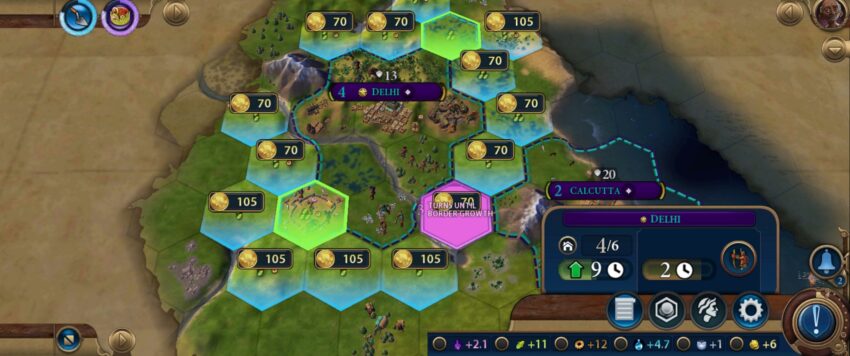
Lenses are a tool you can use to change your view of the world. Each lens will overlay important information that will help you make strategic decisions in the game. Some lenses are activated automatically, like when you choose to place a district from a city’s Production Menu.
Others can be activated manually from the Lenses button in the left tray. These are the lenses you can use in game and what they do:
- Appeal. Shows the appeal level of each tile.
- Continent. Shows the geographic extent of each continent.
- District Placement. Shows valid placement locations for wonders and districts, as well as any adjacency bonuses available for districts. This will only appear when attempting to build a district or wonder.
- Government. Shows the distribution of governments across the map.
- Political. Shows the owner of each tile.
- Religion. Shows the majority religion and religious follower distribution across the map. This appears whenever a Religious unit is selected.
- Settler. Shows recommended city sites and water availability at each tile.
- Tourism. Shows the number of Tourists a tile is attracting.
- Empire. Shows your city borders and district locations with adjacency bonuses.